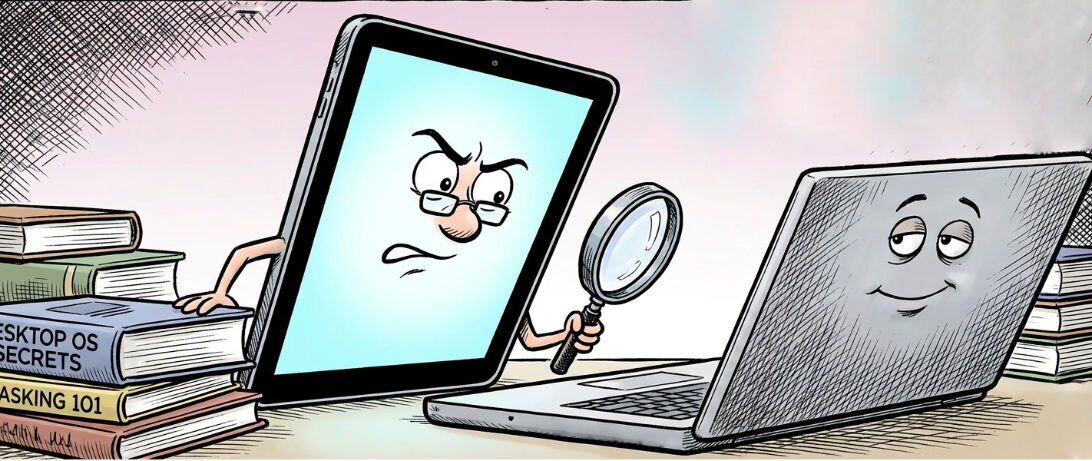
I became the lab rat. Three weeks ago, I put away my trusty MacBook to discover if the technically powerful 11” M4 iPad Pro could handle everything this solo pastor’s jack-of-all-trades work demands — writing, video editing, programming, system administration, the whole enchilada. A year ago, the answer was clearly “no.” Now, I wasn’t so sure.
I’ve been an iPad user for as long as there have been iPads. I preordered the first cellular capable iPad (with its spiffy albeit short lived flexible service plans) before it launched. It shipped shortly after the wifi-only version, so I wasn’t a day one user, but close enough.
The iPad has always been a nice, but — admittedly — not necessary device for me. Initially, I thought I’d find it far more essential than I did.
That’s not denying it was a revolutionary device — the first tablet really worth using. It promised to size up some of the things one did on the iPhone, accomplish some of what one would do on a computer and also be the ultimate e-reader at the same time. It did those things, but in each case, there was compromise.
Was it a passable e-reader? Sure. I have, on a few occasions, leaned on it in lieu of a dedicated e-reader. But, can it compare with the experience of a Kindle or Kobo? Not even close. E-ink and a blissful lack of notifications will win the day every time.
Was it great as a big iPhone? No. There are some apps one might run on the iPhone that run well on the iPad — the vast majority of iPhone apps do run on the iPad — but the early iPad had several marks against it on this count.
At first, “universal apps” were all too rare. Instead, early iPad developers tried to double dip, selling their existing customers iPad “HD” versions of their existing iPhone apps. Worse were the multitude of apps that weren’t iPad-ready at all and just were either tiny on screen or upscaled to varying levels of success. Even many apps that were technically iPad aware just enlarged the phone interface rather than creating a tablet-optimized layout. (This remains a problem over in the Android tablet world.)
While Apple released its iWork office suite and there were some other more desktop-like apps released, the iPad was hamstrung. The same limits in capability one would find on a 2010-era phone app were par for the iPad course.
Not all of that was software developers’ fault. The iPad’s processor was impressive for a super thin mobile device, but that wasn’t saying much in 2010. It was still pitiful compared to the MacBook Pro (or Windows PC) it sat next to.
Still, over time it managed to settle into a comfortable “third device” place. I’ve often recommended iPads to people, despite the limitations. It lived up to, and exceeded, the hype of early tablet concepts such as the CrunchPad for light web browsing, email and the like. For myself, I came to love it as a replacement for a traditional newspaper — something pleasant to hold while drinking my morning coffee and catching up on the world.
But my recommendations usually stemmed from it reaching the holy grail of an Internet device for less tech savvy folks. The iOS/iPadOS platform, with its locked down design, took away the fear of a kid or an older relative accidentally downloading malware or preventing the system from booting by fiddling with ill-advised settings.
There has always been a need for a device for people who will never try to do demanding multimedia, programming or even office work. Grandparents who just want to get pictures of the grandkids are a prime example. WebTV had tried to fill that niche years earlier, but was too compromised. The iPad, though, is genius for that: it could always do e-mail, web browsing and social media well enough.
As the base iPad got cheaper and cheaper, it became easy for me to recommend to anyone needing either of those scenarios: a newspaper-in-a-post-paper-era or an internet-without-all-the-risks device.
That’s been true for a decade, but a parallel course to capture the tablet’s earlier promise has been in the works for as long.
A couple of years after the iPad launched, Microsoft finally found a working formula for its own decades-long tablet quest: the Surface. The initial Surface was a pretty thick device with short battery life made notable by one key benefit over the iPad or the also-ran Android rivals: it could run traditional Windows apps. It was a real, if anemic, PC. A second clever feature enhanced the first: a brilliantly designed snap-on keyboard transformed it from tablet to a full laptop. The con? Its strength was also its weakness. Traditional Windows apps are not optimized for the less precise interaction of fingers on a touch screen.
Fast forward another five years and Apple introduced the iPad Pro. Unmistakably a response to the Surface, down to the quite pleasant, officially supported, detachable keyboard case. It was an impressive jump forward. I loved its bigger and better display, speedier processor and that decent, snap-on keyboard. It was good enough to compose long form content on.
But it wasn’t really a Surface competitor.
Its multitasking was essentially akin to the iPhone still. The introduction of side-by-side apps was nice, but no match for full powered OSes like Windows or MacOS with unlimited windows to work with. The iPad Pro made me excited about the idea of an ultra-thin device with long battery life that could replace a laptop, but in the end, I used my iPad Pro just like I used my previous iPads: as a nice way to consume news with my morning coffee or wind down at the end of the night when I wanted to do the same.
Had I attempted several weeks on an iPad back then, I’d have gone crazy. The lab rat would have rebelled. Most of what I do couldn’t be done on it still. Despite significant progress in performance, it was still not capable enough.
Anyone who has followed Apple’s chip designing story of the last decade and a half, though, knows where we were in 2010 is nothing like where we are today. About the time of that first iPad Pro, the rumor mill went into high gear that Apple might start making its own processors for computers as the chips it put into the iPhone and iPad began to come within striking distance of low-end laptops. Maybe Apple could even compete with Intel on the low-end.
The rumors were, of course, right: M-series Apple Silicon premiered five years ago in the Mac Mini, MacBook Air and 13” MacBook Pro, ushering in a weird era where the cheapest Mac could often defeat the most expensive Macs at tasks. The M1 was amazing — and not just for the low-end. Even a half decade later, one M1 model is sold at Walmart because it was so far ahead of the pack at the gate. My church live streaming work still depends on 2020 Macs that handle demanding video switching beautifully.
Six months after the M1 appeared in Macs, Apple made a seismic shift in its iPad product line: the iPad Pro gained the same processor those first Apple Silicon Macs had. An iPad that finally could be a computer replacement felt within reach.
Nowadays, even the most anemic iPad has a processor that could outperform a lot of laptops. The Pro models are now even on a cycle of getting the latest M-series chips at the same time (or before) Macs. I’m writing this on an M4 iPad Pro that is actually faster than my regular MacBook. Think about that.
All this points to five years of iPads capable from a hardware standpoint of out-Surfacing the Surface. MacBooks have had an almost unbelievable lead over PCs in the performance-per-watt realm essential to balancing robust abilities and battery life. Given that iPads have been drawing from the same supply of chips, they have had the same lead over the Surface.
Except the pesky detail about running a full copy of Windows versus iOS, which is still iOS even if you rename it iPadOS. Thus iPad has been the heart of a performance laptop paired with essentially a phone operating system magnified. That kept it better than Android tablets simply because Apple sold enough iPads that many apps do offer tablet-sized screen optimized interfaces rather than just stretching the phone buttons to comical sizes. But being more capable than Android tablets isn’t a huge accomplishment. Both were comparatively limited to Windows or MacOS.
Apple seemed to be aware of the problem and, around the time of the M2 iPad Pro, it finally seemed to get serious about searching for an alternative to hamstringing powerful devices with software meant for something that fits in one’s palm.
Stage Manager, available on all the M-series powered iPads, could do rudimentary windowing, allowing more apps to be on screen at once. Add an external display, squint, and it sounds almost like a functioning computer.
The Magic Keyboard, released in early 2020, complemented this transformation. While the previous keyboard case added a decent keyboard, the Magic Keyboard added a full laptop-style one and a trackpad.
Apple had heretofore resisted mouse-type interactions with its touch-first tablet, but when using a keyboard, having a trackpad is far more intuitive than reaching over the keyboard constantly to touch the screen. They already knew this and made a point of saying it when rejecting requests to add touch to the Mac, after all.
All of this was good, but not good enough. Stage Manager’s app windows didn’t work like ones on Mac, Windows or common forms of Linux. Switching between apps was confusing and ever present thumbnails of other apps ate up the tablet’s limited screen real estate.
The result? A worse than iPad experience for iPad-y usage to gain a pale shadow of windowing capability too limited to be used like a desktop. I’d try Stage Manager every so often and then turn it back off.
Thus, as Apple continued to roll out more capable iPads, now with good keyboards and trackpads available even, we remained in basically the same place we’d always been. I don’t know a single person who ended up using Stage Manager in a serious fashion to make the iPad a PC-replacement. You probably don’t either.
In a rare, but appreciated show of humility, Apple acknowledged this mess at its annual developer conference this past summer. Head of the company’s software development, Craig Federighi, joked at his company’s expense as he introduced a very familiar concept with sarcastic levels of fanfare: windows would gain standard minimize, maximize and close controls. Sarcasm aside and despite it coming painfully late, any of us actually wanting the iPad to be a robust tool rejoiced as if it truly were a radically new idea.
In fact, iPadOS 26 does better than I think any of us could have hoped: it adds the same basic windowing design language that MacOS has used since 2001. The iconic top-of-the-screen menu bar that has been a feature of Apple’s computer designs since the Mac-precursor Lisa in 1983 also shows up to the delight of power users.
Stage Manager was a painful set of compromises, neither good as a tablet nor desktop user interface. It was jarring and seemingly different for the sake of difference. The brilliance of the new system is the way it artfully integrates classic iPad usage with the even more time tested concept of windowing. Apps still typically start full screen, as before, looking just like they always have on the iPad, but can be easily resized into floating windows and placed next to other windows.
It’s the perfect hybrid of tablet and traditional desktop design. I can be in newspaper and coffee mode with a full screen web page and, with a flick of the screen, be in the midst of a Word document and my research sources scattered about in the same messy-but-productive menagerie I am accustomed to on my Mac.
I really like it and the new design leaves me about as happy with the iPad as I’ve ever been. It takes nothing away from what I’ve enjoyed of my iPad as a “third device,” while moving it oh-so-close to being a very small “primary device.”
The lab rat could function in this maze. Mostly. Living in an almost iPad-only mode for the last three weeks has worked surprisingly well. I’ve actually enjoyed the challenge of getting my workflow to fit it.
But, while the OS no longer is the bottleneck, a few barriers remain between me and the dream of one perfect-for-travel tablet. Every one of them an app.
Thankfully, the limitation is no longer the OS itself. With its new multitasking system and other additions from the past decade (like decent file management, abandoning the “post-pc” attempt to make it appear like files don’t exist), iPadOS really is a desktop-class operating system. Maybe inflexible compared to traditional ones, but good enough for most work.
Some iPad-oriented apps I’ve added into my palette are even as good or better than my usual choices on the Mac. Ferrite Recording Studio is — bar none — the best audio podcasting editor I’ve found on any platform. It had features I scratch my head over not finding anywhere else. Secure ShellFish is an excellent tool for those of us who need to remote control systems over SSH; I liked it so much on the iPad, I started using it on my Mac as well — though it feels more at home in its native land of iPad.
But, in general, the problem is the software has not caught up to the iPad’s capabilities. For example, while Microsoft Word is immensely more capable than it was even a short time ago, it is clear Microsoft is not all in on desktop-class design yet. For example, since iPadOS 26 launched, there has been a bug that keeps me from being able to use my trackpad to select text for copying and pasting. That’s one of the most elementary functions of a word processor and it doesn’t work. I have to set aside the trackpad and use the touchscreen to do it, even though selection worked in previous releases and works fine in other apps.
On MacOS or Windows, if such a bug existed in Word, it’d be fixed in days, if not hours, because it is a big deal. Two months into iPadOS 26, the regression remains. It’s hard to depend on productivity apps treated as such second tier citizens. A few other bugs of similar caliber plague every Microsoft 365 app I’ve been using.
The same (or, at least, glaring limitations) can be said of so many other apps, too. I’ve yet to find a graphics editor that is as capable as Photoshop, Affinity or Pixelmator Pro on the desktop. All three exist to some degree on the iPad, none is quite there. (Affinity comes closest.) With the Apple Pencil stylus and the device’s raw power, the iPad could be the best graphics editing environment. It isn’t.
Same story goes for video. I downloaded the free trial of Apple’s Final Cut Pro for iPad and it is impressive what it can do, but equally frustrating on what it can’t. Attempts to improve touch interactions made precise movement of tracks around far more arduous. It also lacks the ability to use our custom Motion graphics for things like lower thirds and transitions, which means personalized “brand” elements we always make use of in videos must be replaced with generic alternatives. Perhaps one could start projects on the iPad and just bring in the branding bits after moving back to the Mac, but that defeats the purpose to a large degree.
So it goes. My church uses worship service oriented presentations software and it has an iOS/iPadOS app, but it remains one of those glorified phone apps even when on the iPad. It can serve as a remote control, but can neither edit nor present content in itself.
An essential “cheat” if you can get 90% of the way there on iPad is a good remote access tool to do the other 10% on, say, one’s office computer. Surprisingly, there’s no great VNC client for iPadOS to help with that need.
RealVNC — the original — works well, but like that Word bug, has an iPadOS 26-related issue that makes using the Magic Keyboard less than smooth. Screens is pretty good, albeit a tad slow and ridiculously pricey. I’ve settled on Remoter Pro, but two finger scrolling on the trackpad is broken and it doesn’t default to the sensible choice of scaling the remote screen to fit the iPad’s display.
In the end, my days as a lab rat have been such a story of excitement and frustration.
I’ve been slowly moving away from Word and trying to do more of my work in the excellent, minimalist iA Writer that runs pretty much everywhere. Where such alternatives are present, the iPad inches forward for me.
That is exciting.
And it gives the iPad an edge its Microsoft Surface rival may never have: apps truly optimized for it. So long as Windows remains primarily a desktop OS, the Surface will always be a touch-first device trying to run mouse-first applications. The best iPad apps feel touch first but with the increasing prevalence of trackpads, also feel perfectly comfortable with traditional mousing. It’s fluently bilingual.
The iPad is so close to its elusive promise.
But, whether it goes from exciting to genuinely there is going to depend on two things. For some, with minimal unique app requirements, the OS’s recent improvements may be enough. It might be there for you. But for others, like myself, it will depend on if app developers determine there are enough “iPad as a computer” users out there to justify all out support for what the iPad can be.
I hope they do unleash it. A tiny, ultra thin, convertible, mobile computer has been a promise decades in the making. And nothing is closer to capturing that prize than the current iPad Pro. 

Timothy R. Butler is Editor-in-Chief of Open for Business. He also serves as a pastor at Little Hills Church and FaithTree Christian Fellowship.
Pass along this article.
Never Miss Another Article from Timothy R. Butler.
You need to be logged in if you wish to comment on this article. Sign in or sign up here.


Start the Conversation