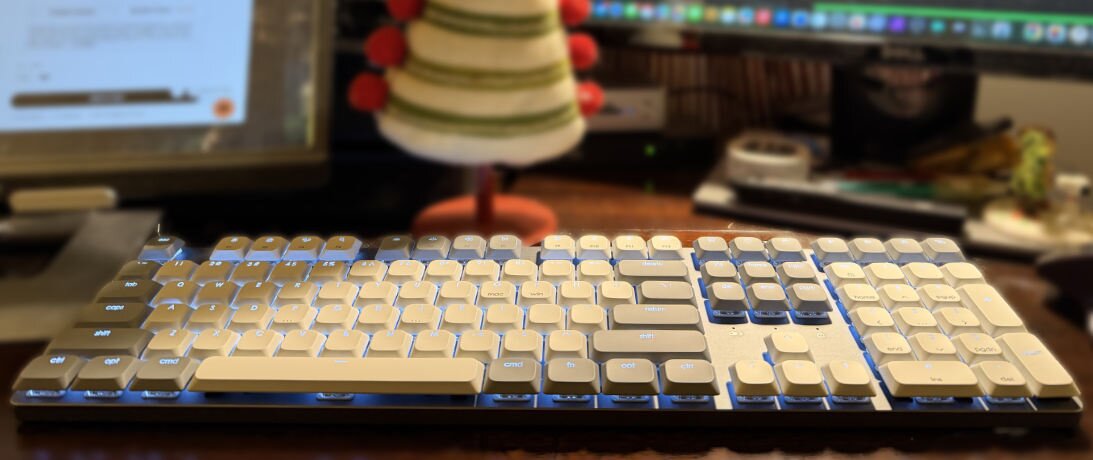
Satechi is a long-running name in stylish computer accessories, but one that comes to mind for, say, a Thunderbolt hub, not a keyboard. The SM3 is a strong argument the time has come for them to be a part of the keyboard discussion.
This is a part of the continuing series of TestyTim.com reviews on mechanical keyboards. You can read more, including a summary of what makes mechanical keyboards notable in general, in the review series overview.
The SM3 is a slim profile keyboard that looks like what Apple’s mechanical keyboard would be, if Apple ever decided to revisit the mechanical realm. It is minimalist and built on an anodized aluminum frame that echoes Cupertino.
I’m not holding my breath for the Apple Magic Keyboard Pro, so Satechi’s immediately caught my eye when I saw it. The company was kind enough to send one to run the OFB Labs gauntlet.
Pulling it out of the box, the keyboard immediately reminded me of the Das Keyboard MacTigr. Both are largely metal construction low-profile keyboards that feel at home in the Mac world, eager to be the Magic Keyboard’s long-lost mechanical sibling.
I’ll come back to the MacTigr comparison several times through this review, the payoff of which will make sense in the end. I should note one of the key differences up front: Satechi’s board is not an exclusively Mac-focused board. It’s ready for Windows users, too.
Traditional mechanical keyboards — including most available today — have full height keys and they “travel” a long way when pressed. They also look bulkier, even with some of the more stylish new keycap designs. Then there are the cheaper, inferior rubber dome or scissor switched boards, most of which today follow Apple’s ultra flat aesthetic set by the mid-2000’s MacBooks.
Low profile mechanical boards occupy an interesting middle ground in the keyboard world. There’s a reason why people keep buying boards that look mostly like ones built 40 or 50 years ago: they are simply the best typing experience, better for your fingers’ well-being and typing speed. But if you want something sleeker, low-profile mechanicals look halfway between the extremes, while providing most of the mechanical feel.

The Satechi SM3’s keycaps are flat on top like a laptop keyboard, save for homing bumps on the F and J keys for touch typists. Though lacking contouring, the keys feel very solid under the fingers and offer a satisfying typing “thock,” not a hollow click, unlike what some cheaper, thinner caps produce. It is almost certainly louder than your laptop keyboard, but nothing that will drive a cubicle mate or spouse to distraction.
The keys are, in an unfortunate miss compared to the MacTigr, made of ABS rather than PBT plastic. Out of the box, you won’t notice the difference, but ABS infamously smooths out and acquires a sheen over time.
Continuing the comparison between the two boards, they take different approaches to the way the keys are shaped. Personally, I prefer the more sculpted designs that Das Keyboard’s slim keycaps use. But, I’ve talked with folks who have used flat keycaps for so long they actually prefer them. So, this is more a matter of taste than an objective issue.
Like an Apple keyboard, Satechi’s board has a nice, clean white backlight illumination, which is pleasant without being obnoxious. The board can do some lighting pattern effects if you want it to, but I suspect most people choosing a board like this one are like me: they like a functional backlight but aren’t aiming for gamer style effects. If you’re going for a soft, quiet glow, this is perfect.
Under the keycaps are the real star of any keyboard show: the switches. And, the SM3 opts for Brown switches from an unspecified manufacturer. While I typically prefer the clickier Blues, with the lower travel of the slim boards, I found the difference in acoustics and feel was not as noticeable as with full profile boards.
Side-by-side with the Cherry MX Red switches in the MacTigr, I was struck by how similar the overall experience was. I’d typically prefer Reds over Browns (which always feel like the black sheep of the mechanical switch family to me), but in this case, the MacTigr felt noticeably scratchier when using both back to back. The SM3 for the win.
The SM3 also wins by having adjustable height. It has two flip out feet that can give it a more noticeable slant. It’s still low-profile, but with a nice touch a lot of low-profile models omit. I flipped the feet out and there they stayed — comfort trumps minimalism, thank you very much.
While the SM3 has a plastic bottom and the MacTigr has a unibody metal design, both are comparably rigid with their respective metal frames. Both are premium feeling typing experiences and in my testing, I was able to type at virtually the same speed on both.
Is a low-profile board as good for typing efficiency or comfort as a full profile? No, but close. Is it a huge step up from a laptop or non-mechanical desktop board? Yes.
I should note Satechi opted for soldered on switches, which means if one key fails, there’s no easy way to replace just its switch. The price, which we’ll get to below, requires a compromise somewhere. I have not had to replace a failed switch on any of my mechanical keyboards, but do prefer having the “insurance” that comes from the option to do so.

This is a place the Satechi shines in my running comparison throughout. The SM3 offers support for two Bluetooth connections, sports a 2.4 GHz receiver and can also function as a wired board. This is very much standard modern, mechanical keyboard fare, but is a decisive advantage over this column’s foil, the MacTigr, which is wired-only.
Like most good, non-programmable boards, it also supports switching between Mac and Windows modes. The media/function row places shortcuts where a Mac user would expect them, though these can be easily switched with a key press to opt for a Windows-friendly order or eschew media keys entirely for classic F-key functionality.
Unlike many boards, though, Satechi goes an extra step and includes both the default (Mac) keycaps and alternate Windows keycaps. So, whichever system you use (or use most), your keyboard will both function properly and look the part while doing it.
The board comes with a middle of the road 2500mAh battery. A larger one might be nice for a backlit board, but it is nothing to complain about.
I would love to see an SM3 Pro that offered QMK firmware. That open source “brain” for keyboards allows easy customizability to fit any current or future workflow, which is a nice way to future proof a board. But, as useful as that sounds in theory, I find I rarely use it, so that’s more of a “wouldn’t it be nice” than an overlooked must have.
I’ve intentionally kept returning to the MacTigr, because both boards have a similar target: a Mac-friendly mechanical board that actually looks the part. While the delightful Matias Tactile Pro is the original “modern” Mac mechanical keyboard, it looked the part twenty years ago. The SM3 might be the best fit available today for someone wanting what looks like a full Apple minimalist desk, but refuses to accept Apple’s less-than-top tier typing experience.
I promised the comparison would pay off for those interested in the SM3 and it literally does. While the MacTigr clocks in at $200 and justifies it with its premium build quality, the SM3 offers nearly as good of fit and finish and does so for $80 less. That’s a steep price difference — and the present pre-Christmas sale extends the gap to a full $103.
There are other boards coming into this realm. Keychron, for example, always has something interesting, albeit less minimalist, in their broad array of nicely made boards. Perhaps outside of the MacTigr, the most closely comparable is the Logitech MX Mechanical, which has yet to cross into OFB Labs, but it is still $60 more than the SM3’s non-sale price.
For anyone wanting a stylish, low-profile, metal-bodied board, the SM3 is very aggressively priced. Especially in the realm of Apple-coordinated options, it’s a steal. It’s enjoyable to type on, looks great and has the core features you’ll need. On sale, it offers bang-for-the-buck uncommon to most such aesthetically inclined peripherals.
You can get an excellent full profile board for the same or less, but if you want a Pro version of the Magic Keyboard — or simply need a mechanical as svelte as possible to tuck in your laptop bag — it’s nearly unbeatable at its present, sub-$100 price (Satechi SM3; $119 MSRP, on sale for $96, satechi.com). 

Timothy R. Butler is Editor-in-Chief of Open for Business. He also serves as a pastor at Little Hills Church and FaithTree Christian Fellowship.
Pass along this article.
Never Miss Another Article from Timothy R. Butler.
You need to be logged in if you wish to comment on this article. Sign in or sign up here.


Start the Conversation